
Standard Operating Procedure: AI Output Review
Best Practices for Reviewing and Approving AI Outputs

Purpose
We have reached the point where the use of Large Language Models (LLMs), or GenAI, is becoming very common and is being rapidly adopted by organizations and businesses. We need a standard procedure to effectively use these tools and optimize outcomes.
This SOP is designed to use any AI tool or API to generate content drafts, review them with an editorial mindset, finalize the output for real-world use, and keep an ongoing record.
The core priority is to ensure that nothing generated by an AI system is published or shared without a human review, regardless of which platform or provider you use.
This SOP therefore applies to written content, summaries, reports, emails, social posts, or any other text produced using AI models.
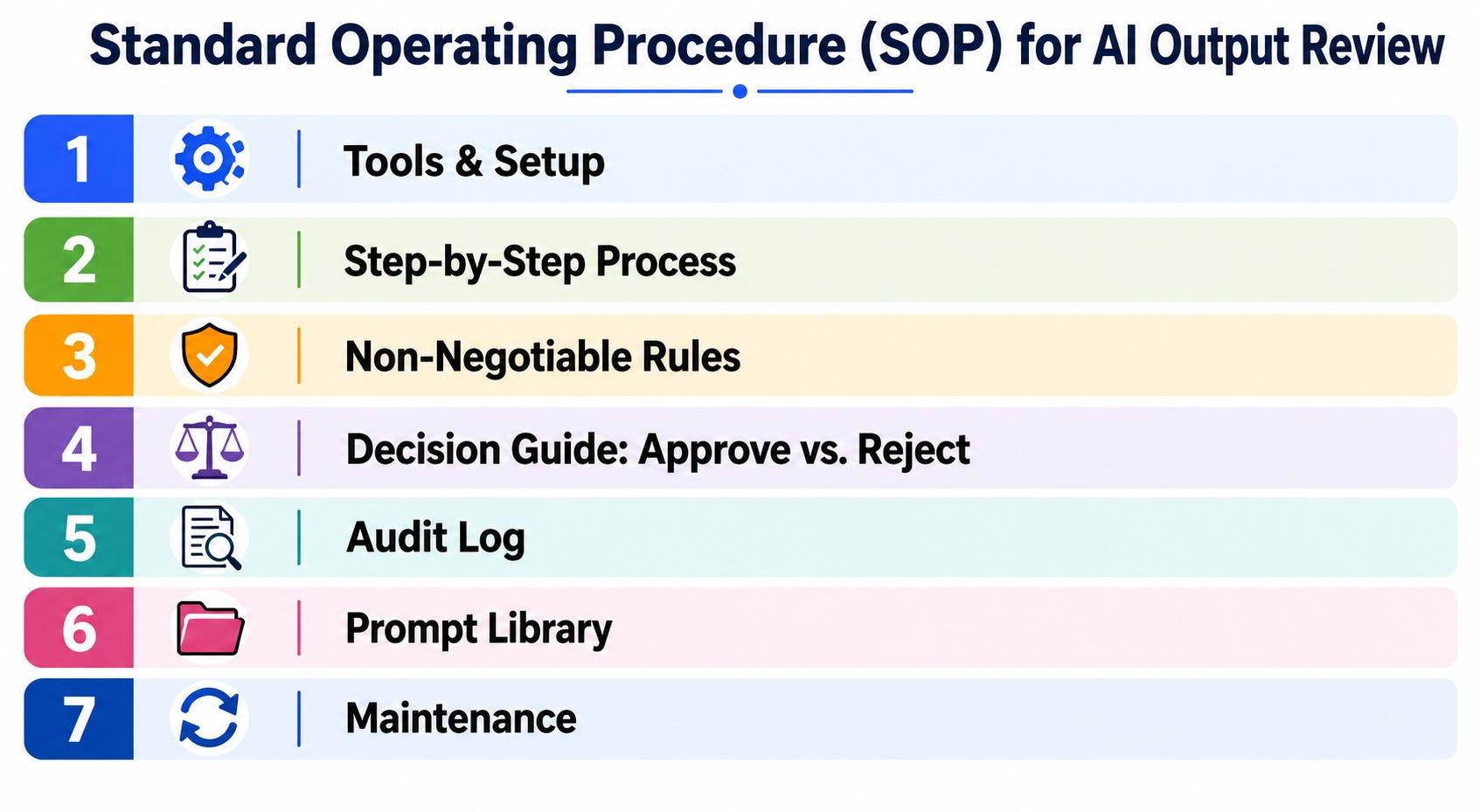
1. Tools & Setup
The first step is to choose and integrate an AI service based on organizational need, preference, budget, and policy. Once decided, follow the setup procedure:
• API/Platform: Anthropic Claude, OpenAI GPT, Google Gemini, Mistral, Cohere, or any other provider that offers a chat or API interface.
• Access Method: Web interface (e.g., Claude.ai, ChatGPT), API via code (Python, JavaScript, etc.), or a third-party tool that wraps an AI model (e.g., Notion AI, Jasper, Copy.ai).
• Python Users: Install your provider’s SDK (e.g., pip install anthropic / pip install openai), or use liteLLm for a single unified interface across all providers.
• No-code Users: Those without a technical background do not need to worry about writing code. You need only copy and paste prompts into a web UI. The review and logging steps remain identical.
Folder Structure
Maintain the following four folders regardless of the type of tool you use, and complete the one-time setup:
• /drafts — raw AI output, saved immediately after generation
• /approved — reviewed and signed-off content
• /rejected — discarded drafts with logged reasons
• /logs — your audit trail (see Section 5)
These can be simple folders in Google Drive, Notion, or on your desktop for no-code users.
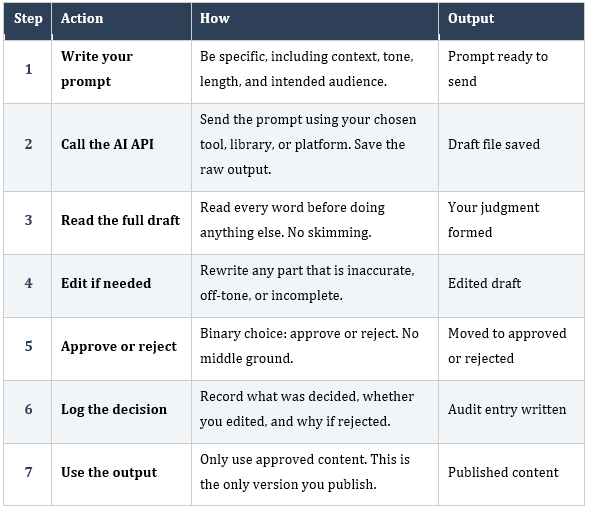
2. Step-by-Step Process
This part is the most critical, and emphasis should be placed on following the exact sequence without skipping a step.
3. Non-Negotiable Rules
• Rule 1: Never publish directly from a raw AI response. Always route through /approved.
• Rule 2: Never paste raw AI output into a client document without reading it first.
• Rule 3: If you edit the draft, the audit log must reflect “edited: yes.”
• Rule 4: If a draft is rejected, record the reason in the log.
• Rule 5: Sensitive or confidential data must only go through secured, approved interfaces. Never input it into a public or consumer AI chat if your organization restricts this.
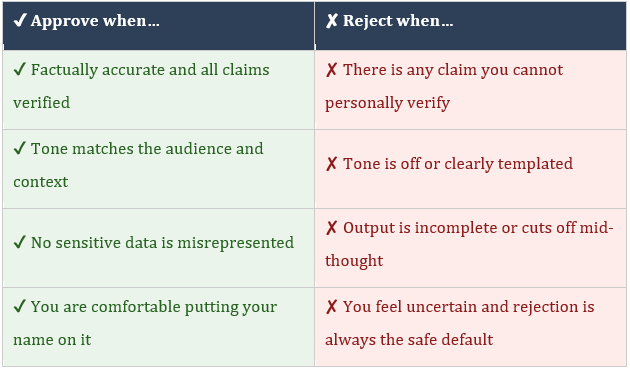
4. Decision Guide: Approve vs. Reject
5. Audit Log
Strictly follow the practice of logging every approved or rejected draft. Use the method that fits your setup.
• Code users: auto-log to logs/audit.jsonl via script
• No-code users: maintain a simple spreadsheet or Notion table
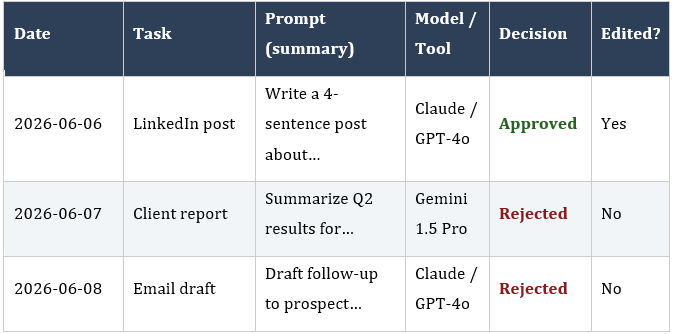
Each log entry must capture:
• Date and time of the decision
• Task description and prompt summary
• AI model or tool used
• Decision: approved or rejected
• Whether you edited the draft
• Reason for rejection (if applicable)
Sample Log
6. Prompt Library
It is highly recommended that you keep a copy of your best-performing prompts to reuse and improve them over time. Store them in a /prompts folder.
Template Format
• TASK: [what this prompt is for]
• PROMPT: [the full prompt with {VARIABLE} placeholders]
• EXAMPLE OUTPUT: [a good output for reference]
• LAST UPDATED: [date]
Name prompt files clearly, for example:
• linkedin_post.txt
• client_summary.txt
• meeting_brief.txt
These prompts can be used with any alternative model or platform without changing your review workflow, in case your usual AI tool is unavailable.
7. Maintenance
Make sure to set aside at least one dedicated time per week for maintaining your output review, along with a monthly maintenance cycle.
Weekly Tasks
• Identify patterns in what fails review among rejected outputs.
• Check and update prompt templates based on what required the most editing.
Monthly Tasks
• Check your audit log and review approval rate and edit rate
• Archive approved outputs older than 30 days
• Re-read this SOP and update it if your workflow has changed